Disclosure Properties
Description
The Disclosure Properties control the appearance of the disclosure, including the disclosure's name, type, content shown in the disclosure and optional CSS o style the message.
Properties
- Name
The name of the disclosure.
- Group name
(Optional) You can assign an arbitrary Group Name to this item. If you have a lot of disclosures, then assigning Group Names to each item can be helpful when you are searching for a particular disclosure.
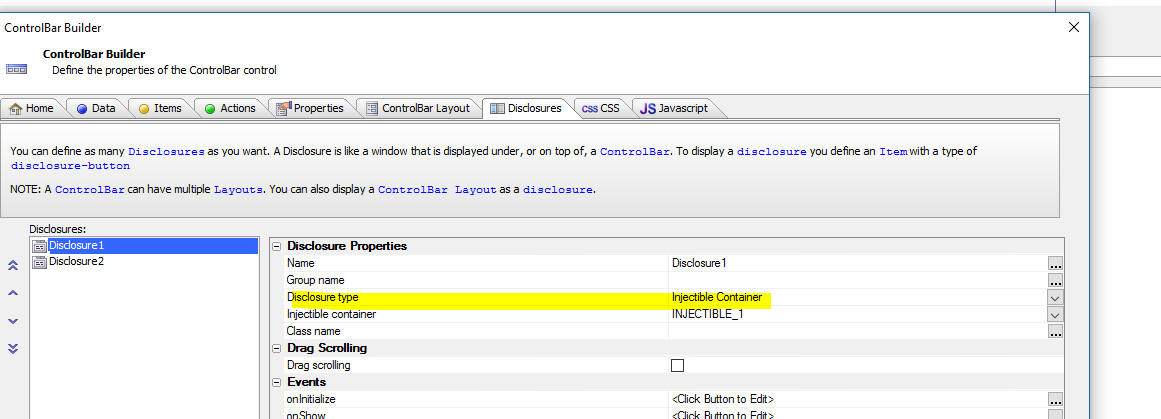
- Disclosure type
Specify if the Disclosure displays HTML (defined here), or the contents of an Injectible Container Choices include HTML, Injectible Container.
- Injectible container
The Injectible container that contains the content to insert into the disclosure. This property is only available if Disclosure type is set to "Injectible Container".
- HTML
The HTML to display in the disclosure. This property is only available if Disclosure type is set to "HTML".
- Class name
One or more class names applied to the disclosure. If you define the CSS for the Disclosure in this component (on the CSS tab), it must be defined using the 'CSS defined at the UX Component level'.
Injectible Content
When you create a Disclosure in a ControlBar you can now set the Disclosure type to Injectible Container.
Previously, you could add a special Injectible Content placeholder in the HTML that you defined for the Disclosure. Setting the Disclosure type to Injectible Container is easier than using Injectible Content placeholders in the HTML and it has another advantage -- it makes it very easy to display List controls in the disclosures displayed by the Control Bar.
Showing a List Control in a ControlBar Disclosure
A powerful feature of the ControlBar is its ability to display 'disclosures' (i.e. windows.) These disclosures can be animated into view from various positions on the screen. A common requirement is to show a List control in a disclosure.
This video shows how this can be done.